BLOGGER TEMPLATES AND TWITTER BACKGROUNDS

Friday, October 29, 2010

week 8 : A Need for a Systematic Evaluation !!!

Creating an educational website used as a teaching and learning purpose needs lots of consideration as there is a need to complement a group of target audience. Thus, a rubric works better in helping the one who uses the platform for an educational purpose. A rubric works more as a checklist and reminders for certain aspects that one might not be thinking of when designing a website. Designing a website for an educational purpose needs lots of considerations and modifications. 

Thus, some aspects that should be considered while designing an educational website are:

1) usability criteria : purpose, homepage, navigation, design, enjoyment, readability

2) content criteria : authority, accuracy, relevance, sufficiency, appropriateness

3) educational value criteria : learning activities, activity plan, resources, communication, feedback, rubric and help tools.

4) vividness criteria : links and updating

Why we need rubrics to evaluate an educational website? In my opinion, the reasons are :

a) with the existence of internet and web 2.0 applications such as blogs and wikis, teachers need to clarify whether the website designed is user-friendly or not. This will eventually leads the teacher to first check the navigation of the website. Navigation tools of a website for education must be clear and easy, so that learners are not confused or demotivated while attempting to learn.

b) a rubrics help teachers to make sure whether a website designed is usable and serviceable to avoid users' frustration or dissatisfaction. A poorly designed website will not retain visitors long enough to pursue content.

c) rubrics assist to evaluate the pedagogical and psychological value of an educational website. A good website for primary school children must consist of a good layout with background colour that will not hurt the users' eyes.

d) Rubrics determine whether the website is being developed, changed and updated continuously. For example, Science subject is a dynamic subject. There is always new invention and discoveries made. Thus, the site should always being updated, so that students will feel that there is always new things learned and discovered.

Monday, September 20, 2010

Week 7: Sharing is caring !!!

This week around, we were introduced towards some platforms that can be used for teaching and learning. They are:

1) wikis

2) blog

3) social networking

4) media sharing

These are some platforms that allows knowledge to be shared. There are differences between the application offered by all the platforms. BUT, similarly, all the platforms allow communication to take place by having a chat box, feedback space such as comments.

I was amazed by wikis in the first place. One of the wikis that i've been using is googlesites.

Wikis has more flexibility, application and we can control navigation and add anything that we like. We may also chat by adding chatbox and it is more organised compared to blogs that are only represented by entries that are posted. Wikis allows us to change page template and post things like a blog in 'announcement' (one of the template for creating a page)

This is my google site for my PKEY 3101.

  
About Me...

  
See...It can also be integrated with 'PICASA WEB SLIDESHOW', videos from Youtube, Images, Calendar, Adsense, etc.

Sunday, September 19, 2010

Week 6: Not just a Lab !!!

What I meant by 'Not Just a Lab' is 'It is a high-tech lab known as a Micro-computer based laboratory (MBL)'.

this week is the testing time. Last week week, we learn more on the theory, so this week is more on the application of MBL.

My group tried using the Magnetic Field Sensor and it seemed to be a bit complicated at first as in past physics classroom, we used Gaussmeter to measure the strength of magnetic field. 

Magnetic Field sensor 

Magnetic Field sensor is used to investigate the relationship between magnetic field intensity and the distance from the magnet. This experiment was conducted using some materials such as magnetic field sensor, USB link, permanent magnet and ruler.

The procedure of the experiment can be explained in these following steps:

1) Magnetic field sensor is plugged into the USB link that is connected to a computer

2) Data studio is configured with a graph of magnetic field intensity

3) The tip of the magnetic field sensor is placed, so that it is touching he permanent magnet. Click START in DataStudio to begin collecting data.

4) At the same time, magnetic field sensor is moved very slowly and steadily away from the permanent magnet.

5) The intensity of the magnetic field sensor in the DataStudio graph is observed.

6) The recording is stopped when the intensity reaches zero. 

The Data collected is in the form of a graph. The intensity of the magnetic field is measured in Gauss. The unit is still the same whether we used a gaussmeter or a magnetic field sensor in MBL.

The advantages of the device:


       The tool can be used effectively to collect, analyze and display data in the form of graphs and charts, showing relationships that change as the values of the variables change.
       Data can be stored in computer’s memory.
       Students’ ability to interpret graphs is improved.

It saves time if the lesson is aimed to finish in a very limited time.
It is suitable for independent learners that are very proficient in science.
The disadvantages of  the device:

       As data collected is transferred into graphs, the students might not be able to see the relationship between the diagram of the magnetic field and the graphs collected.

       It is not suitable for the primary school learners as they need to master the science process skills first.
       Even though, students of level 2 can grasp abstract concept, but in learning  science,their scientific and manipulative skills are still developing at this time.


       The discourse used by the device is considered to be complex. Primary school students have little vocabulary knowledge of the second language. So, some instructions can be considered to be too high
So, in my opinion,
1) Primary school students should be taught the basic hands-on activity, so that they know on how real science (without technology) works. A strong basis about a science concept must be formed before they use technology to simplify things.

2) Secondary school students can be taught by integrating technology as they have the basic concept and this will be their ‘prior knowledge’ to construct new knowledge when technology is integrated.

Week 5: Strategies in Designing Application Tools

Prof Rohaida proposes 7 strategies in designing application tools for Science teaching and learning (during the lecture).

Those are:

1) MBL- Micro-Computer Based Laboratory

2) Drill and practice

3) Tutorials

4) Simulation

5) Problem-solving

6) Info-retrieval

7) Educational games

From the activity, I found that most of application for science for primary school pupils give emphasis in three strategies which are: Drill and practice, simulation and educational games.

Drill and practice

Science involves learning of concepts and its consequences. Thus, drilling helps to emphasise the concept, so that pupils won't misinterpret it. Even though this sounds rigid, but, drilling is good strategy to reinforce the concepts learnt. Practice, on the other hand, work on testing the pupils whether they understood the concept or not. Besides that, drill and practice assist to form a strong basis of science concepts to primary school pupils. A strong basis of concept will help them later in learning science in secondary levels which give more emphasis on tutorials and problem-solving, which requires a more independent attitudes in learning.

Educational games


This strategy strikes the nature of children who are playful. Games are applied in most of application tools for science as they are appealing and they attract pupils to engage themselves in learning. They consist the element of question and answer.Questions are good stimuli to activate learners' mind and thinking skills. This is like an 'indirect learning' approach. By looking at the surface, some would say that pupils are playing games, but actually playing games are good to develop sense of alertness and their understanding. Thus, that's why games are used often in designing application tools for primary school pupils. 


All in all, designing application tools need a varied consideration from the psychology of the target group to the education level of the target group. A proper consideration of strategies will give a tremendous impact on the students development and interest towards learning science.

Sunday, August 22, 2010

3rd class (4th week) : BeHaViOuRiSt vs CoNsTrUcTiViSt.

What is the behaviourist (directed instructional ) approach?


Direct Instruction assigns a central role to the teacher in explaining, modeling, and providing opportunities for practice with feedback. The goals are understanding, logic behind skills; automaticity, skills are over learned to the point that they are used with little mental effort; and transfer, something learned at one time is applied later in another setting.
 (for more explanation of this approach, you may visit this site :


This approach proposes a teacher-centered classroom. I requires teachers to be an efficient planner of the whole lesson. Lesson can be very structured as they have to follow teacher's instructions and steps in order to learn a subject. I think this is a very rigid condition of learning. However, this is also useful when it comes to theoretical based-learning and the lesson taught should achieve intended learning outcomes. Thus, procedures are needed to monitor the progress of the lesson, so that no steps is left behind. 

The same goes to websites for learning science. Some of them are designed to be in this approach, so that students who do not have prior knowledge about the subject matter may not be having problems to construct their knowledge. So, this will play a lot as a helping hand too for students who need more guidance when it comes to 'Science'. 

Some of the sites that adopt the use of this approach are:

 1. http://www.sciencekids.co.nz/  


2. http://www.sciencetoymaker.org/

Niava Air Rocket

A rocket model

What is the constructivist approach?

Learners construct their own understanding rather than having it delivered or transmitted to them. Learners use their own experiences to construct understandings that make sense to them. New learning depends on prior understanding and is interpreted in the context of current understanding, not first as isolated information that is later related to existing knowledge. 

So, now let's see the benefits of this approach when it is inculcated in science learning via technology. 


(a) There are opportunities provided for students to view and explore themselves about the information.
(b) They provide more activities that are creative and to make students think about the causes and consequences.
(c)  More discoveries rather than reading concepts and facts.
Some of the websites are:
2. http://www.coolscience.org/CoolScience/kidszone.htm

Question may activate prior knowledge

 All in all, both approaches should be applied and neither should be rejected. So, see you on the next entry!!!

Monday, August 2, 2010

The second Class: Slowly Immersing!!!

Thursday, 29th July 2010

It's a replacement class as Prof was busy on Tuesday (27th July 2010).

Today, we learn about computers and common terminologies associated with this invention. Generally, computers are a blessing to us. It is an enormously powerful tool for doing quick accurate computations. Thus, computers are used in mass communication, in flight reservations, in air traffic control, in banking, in scientific research, in teaching and learning process and virtually any types of activity that requires fast reliable calculations and quick data processing. I shall say, it's fantastic!!!  

Some knowledge we learnt during the class and it is actually the tools related to computers. They can be divided into hardware and software. Hardware refers to input devices and output devices. 

Some of the input devices are:

MOUSE

  
SCANNER

Some of the output devices are:

PRINTER

SPEAKER

And softwares:

WINDOWS MEDIA PLAYER
  
INTERNET EXPLORER
Now, let's move on to the gist of the lecture:

1) Artificial intelligence


What' that??? This term refers to:


(a) intelligent tutoring systems
(b) intelligent learning environment
(c) adaptive hypertext systems
(d) computer-supported collaborative learning systems


The role of AI in education has been multiplied since the evolution has taken its place. Some years ago, the role of AI is just to develop techniques which stimulates human intelligence. But, with the tremendous improvement in technology, it is also used to support communication with the learner. 


From my point of view, AI has lots of benefits in education. It caters the interaction setting for education to take place. By online interaction, learners can share ideas and information with just a click.  Online tutoring is one of the advantages of AI. This proves that learning can occur anywhere and learning is actually beyond vicinity of students' classroom. Thus, the application of AI does make learning to be effective and proactive. 


2) Virtual Reality


Based on the article entitled 'Exploring Virtual Reality for Classroom Use : The Virtual Reality and Education Lab at East Carolina University', Stuart and Thomas (1991) has listed 8 roles of virtual reality:


(a) explore existing places and things that students would not not otherwise have access to

(b) explore real things that without alteration of scale in size and time, could not otherwise be effectively examined.

(c) create places and things with altered qualities

(d) interact with people who are in remote locations through global clubs with a common interest or collaborations on projects between students from different parts of the world

(e)interact with real people in imaginary spaces to support interactive design. 

(f) interact with real people in non-realistic way

(g) create and manipulate abstract conceptual representatives, like data structure and mathematical functions

(h) interact with virtual beings, such as representations of historical figures and agents who are representatives of different philosophies and viewpoints participating in simulated negotiations.


Thus, virtual reality provides us with manifold benefits in education. Perhaps we should start looking at how technology can benefit us, instead of taking care on the disadvantages of technology. 

Ok... I shall call it an 'entry' then...See you on the next post with more sights of technology in science education... until then...start thinking about what technology can offer us if we are willing to exploit it... 


Sunday, August 1, 2010

The first date with Prof. Dr. Rohaida...


Tuesday, 20th of July 2010


It is the second week of the semester, but it’s the first time we met with our lecturer due to our ignorance, last week. For this time around, I would not be saying ignorance is bliss. We should be trying to reach her by any means even though we were still new in the faculty. So, we learn a lesson and I am sure we won’t repeat it anymore. For the time being, I just have this to say, 
“Sorry, Prof.”

Ok…Let’s reflect!!!
First and foremost, the ‘date’ began with the introduction of the course and the assignments. We were informed about the expected learning outcomes of the course, too.
Secondly, we were asked to create a blog to write our own reflection about our progress with this course. It’s a bit frightening as I am not that good in writing blogs. It’s a new thing for me. But, one thing that I know, to get use of something is to do it again and again without hesitation. For me, this would improve the way I express myself and help tracking the progress of my learning within these fourteen weeks.
The next thing on the list is the tools that we learnt on that day. There were four old technological tools used in teaching of science. They were 
OHP, visualiser, television and video player
We were divided into 4 groups and each group took one tool and discuss. Then, we would have to explain it to the whole class.  
My group members are:
1.MARHANI
2.HAFIZUDDIN
3.NIZAM
4.NAZRUL
These tools are some of the man-made things that have improved the quality of teachings immeasurably. Thus, each of these things has its own functions.
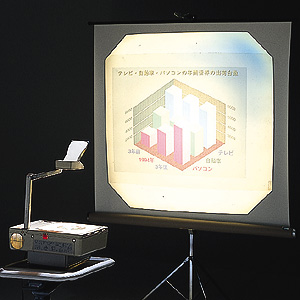
OHP a.k.a Overhead Projector.

I’ve been seeing this tool since 7 years old and it’s still being used effectively by teachers in many schools to aid teaching and learning process. OHP works together with transparency. In later days, we have teachers to write on it, but today we may produce the typed version of it by just photocopying from books onto the transparency. So, technology never stops improvising things until it gets easier. 


 Visualiser.

What’s that??? This is the first thing that popped into my head. I didn’t know about the existence of this tool as it was quite expensive and rarely found in common schools in Malaysia. So, my group has to search for the information and explain its features and usage in teaching science in a short presentation by the end of the day. As far as I’m concerned, this tool is actually a more sophisticated version of OHP. It is more efficient as it may project coloured objects on a screen without affecting their original colours. It could also be connected to computers to transfer information. Thus, I found this tool is interesting and fantastic. This could make science as an interesting subject to children as they view objects in colours, rather than in old black and white forms.

 Television + video player.  
It’s tv!!! So, I guess nobody would dare to admit if he does not know what is a tv… In education, tv works best with video player. Both complement each other. Without the tv, image or videos cannot be flashed and watched. And without a video player, videos cannot be played. So the interdependence which exists between both of them helps to make them function better.  

  
Look!!! There are some old magazines about tv...